Popup Browser4.6
Publisher Description
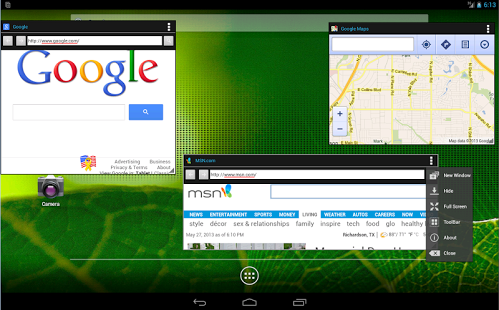
The Floating Web Browser application will change the way people use their Android device. The app enables true multi-tasking on Android by allowing you to have multiple popup floating browsers on your screen and interact with them simultaneously. You can hide to background, and re-float the windows as you wish, providing power users a familar desktop OS experience.
* Support for multiple windows, click on app icon for a new window
* Youtube video support in Android Lollipop
* Pinch to Re-size Support for adjusting windows
* Minimize, Hide, Focus, UnFocus and Maximize Windows.
* Open Web address links or shortcuts using Floating Browser as a target browser
* Works great on smartphones with large screens (Glaxy S3, Note, Note II) especially Tablets
* True Multi-Tasking Support
* Windows smoothly transition on landscape to portrait orientation change
* Address ToolBar support for navigating within the web page
* No root or custom rom required.
* Lightweight less than 0.5 mb
* Minimize all windows with ‘Menu’ key
* Floating PopUp Browser starts quicker than the stock system browser
The traditional way of multi-taksing applications on Android is:
1) start an app 2) use the app 3)close the app 4) launch another app …. close it 5) launch previous app again!
Floating Web Browser allows you the skip the redundancy of Android and introduces true multi-tasking with side-by-side windows. Users are no longer restricted to interacting with a single app at a time. Modern Android devices have multi-cores and increased RAM, however the Android OS has not kept up with these hardware improvements. Floating Web Browser takes advantage of larger screen sizes and accelerated hardware to provide Android power users with a new experience.
Permissions requested by this app:
< android.permission.INTERNET = for opening web pages />
< android.permission.ACCESS_NETWORK_STATE = to detect if device is connected to internet>
About Popup Browser
The company that develops Popup Browser is digitalPortal. The latest version released by its developer is 4.6. This app was rated by 8 users of our site and has an average rating of 2.6.
To install Popup Browser on your Android device, just click the green Continue To App button above to start the installation process. The app is listed on our website since 2014-11-21 and was downloaded 3,718 times. We have already checked if the download link is safe, however for your own protection we recommend that you scan the downloaded app with your antivirus. Your antivirus may detect the Popup Browser as malware as malware if the download link to com.digitalportal.floatingwebbrowser is broken.
How to install Popup Browser on your Android device:
- Click on the Continue To App button on our website. This will redirect you to Google Play.
- Once the Popup Browser is shown in the Google Play listing of your Android device, you can start its download and installation. Tap on the Install button located below the search bar and to the right of the app icon.
- A pop-up window with the permissions required by Popup Browser will be shown. Click on Accept to continue the process.
- Popup Browser will be downloaded onto your device, displaying a progress. Once the download completes, the installation will start and you'll get a notification after the installation is finished.
Program Details
System requirements
Download information
Pricing
Version History
version 4.6
posted on 2014-11-21
4.6,-Youtube Video Support (only in Android Lollipop 5.0),-Full support for Android 5.0 Lollipop,-Speed improvements, websites launch 45% faster,-Added support for focusing a single window (bring a window to front on-touch),-Added Share Feature to send URL to other browsers,-Search directly from toolbar,-Back button on device now goes back on browser,-Menu button on device minimizes all windows,-Touching website icon opens Toolbar
version 1.7
posted on 2013-06-29
Several fixes and updates
